How to Log Into Windows With No Password
When Windows starts you generally get a log-in screen that asks for a password...
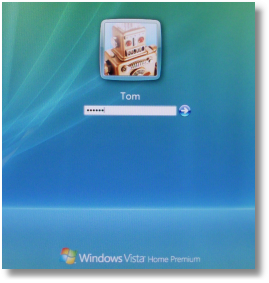
This is a safety feature that helps keep users who should not be using your computer or your account on the computer if multiple people use the computer. In situations where multiple people use a computer or the computer is in a public place it's a good thing to not mess with this system. Many people, however, have computers where it would be rare for someone unauthorized to access the computer. In these cases it would be handy to be able to just turn the computer on and not have to enter a password as Windows starts up. There are two ways to make this happen: the good way and the bad way.
The bad way would be to go to the Control Panel and choose User Accounts in order to remove the password...
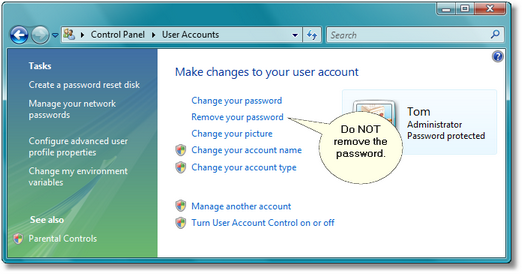
If you do this then portions of Windows will either stop working or give you results you did not expect. A user account with no password is considered by Windows to be insecure and Windows sets itself accordingly with limits on many things allowed by that user. Does not matter if the user is designated as an Administrator or not.
The good way would be to keep the password but let Windows enter it for you. This will still potentially open your system to abuse but only by someone coming along and using the computer without you being around. In most cases you should know if this is possible or not and determine the risk of letting Windows log you in automatically.
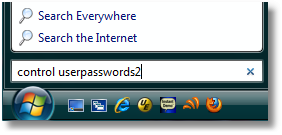
- Open the Start Menu and, in the search box, type...
command userpassword2
...then press the Enter key. (In XP use Start|Run and then type the words into the dialog.) - This command opens the Advanced User Accounts Control Panel...
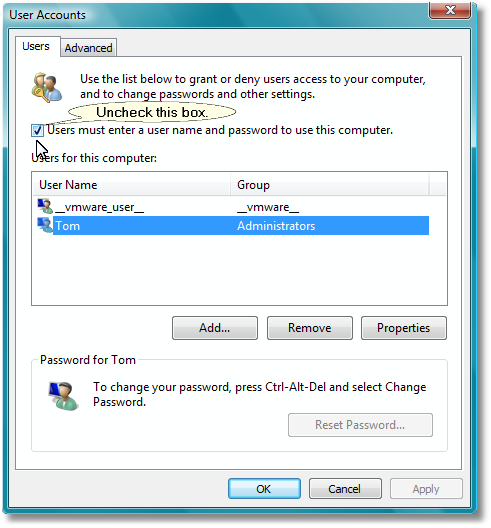
Note the box beside "Users must enter a user name and password to use this computer." It is checked by default. Uncheck the box and then click on the Apply button (that should light up when you make the change). When you do a password box opens where you enter the password for the account. This also confirms it is the account holder requesting the change.
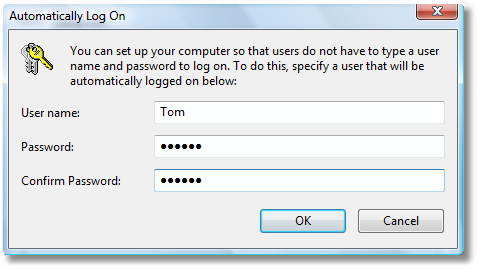
- Once you click on OK the change takes effect and the next time you restart the computer it will automatically log into the account with no password request.
There are other things you can do at the Advanced User Accounts Control Panel. May get into those later. For now, experiment at your own risk.
Note: This does not change the behavior when coming out of hibernation. To change that use the Power Options Control Panel applet to tell Windows if a password request is needed or not on waking up.



